Editing software: trick sequences

> 10 years ago
Reply
Register to post, see what you've read, and subscribe to topics.
NickT
NickT
WA
1094 posts
WA, 1094 posts
21 Feb 2012 9:34am
Just wondering what software to use to produce sequence shots (multiple images overlaid over the same background)?
Oh yeah I have a Mac aswell.
Saffer
Saffer
VIC
4501 posts
VIC, 4501 posts
21 Feb 2012 1:18pm
Photoshop is the best. You can download a 30 day trial of Photoshop CS5. Just get the photoshop component, you won't need the rest of the items and it will reduce the download size.

You can find tutorials on how to do it on youtube.

Katoe
Katoe
NSW
102 posts
NSW, 102 posts
22 Feb 2012 1:34am
Heres one from the infamous Safety Bay pond last week. Photoshop is your friend for this.


TurtleHunter
TurtleHunter
WA
1675 posts
WA, 1675 posts
21 Feb 2012 11:09pm
been trying to do a sequence of the rider and the kite with photoshop but can only seem to get the rider overlaid. Is there a way of doing both with photoshop?
NickT
NickT
WA
1094 posts
WA, 1094 posts
21 Feb 2012 11:32pm
Thanks guys, think I have to get some better photos now!
Rob S
Rob S
VIC
391 posts
VIC, 391 posts
22 Feb 2012 10:19am
TurtleHunter said...

been trying to do a sequence of the rider and the kite with photoshop but can only seem to get the rider overlaid. Is there a way of doing both with photoshop?


Roughly, this is the process I use

Use Photoshop
Use first pic as layer one
Cut portion of pic 2 you need and place it in the apprpriate spot as layer 2
repeat for subsequent pics.
Use eraser and clone stamp to clean it up

If a layer is obscuring the kite just use the eraser to reveal it.

Sir V
Sir V
QLD
490 posts
QLD, 490 posts
22 Feb 2012 10:46am
Rob S said...

TurtleHunter said...

been trying to do a sequence of the rider and the kite with photoshop but can only seem to get the rider overlaid. Is there a way of doing both with photoshop?


Roughly, this is the process I use

Use Photoshop
Use first pic as layer one
Cut portion of pic 2 you need and place it in the apprpriate spot as layer 2
repeat for subsequent pics.
Use eraser and clone stamp to clean it up

If a layer is obscuring the kite just use the eraser to reveal it.
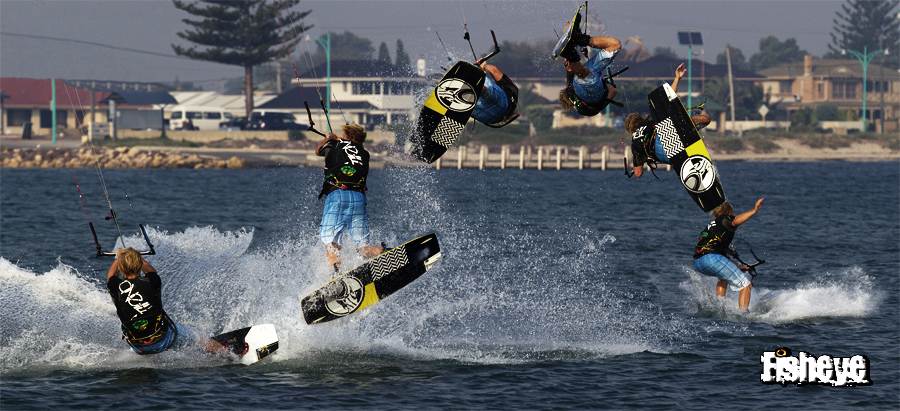


This is how I've done mine as well but the Photoshop method Safer posted is mint
giBiLatoR
giBiLatoR
QLD
147 posts
QLD, 147 posts
23 Feb 2012 6:12pm
The real difficult part is replicating it in videos, With moving background, only two programs get you out of this pickle, avid/afterfx.
Capt Loopy
Capt Loopy
NSW
276 posts
NSW, 276 posts
23 Feb 2012 9:14pm
GIMP
www.gimp.org/
It's is a powerful tool just as good a photo shop. And best of all it's free.
Please Register, or first...
Topics Subscribe Reply

Return To Classic site 😭
Or... let us know if a problem, so we can tweak! 😅